Issue: Unable to Play WebRTC H.265 Stream on Custom Chromium Kiosk Setup
I’m facing a problem while trying to play a WebRTC stream (H.265 / HEVC) on a custom kiosk setup.
The kiosk runs a locked-down Chromium browser with custom flags, launched through a script that only exposes a terminal and the browser.
Everything works fine except H.265 playback in WebRTC — the stream simply doesn’t play.
Since the Vicharak Axon board supports hardware HEVC/H.265 decoding, I expected the browser to handle it, but it seems Chromium is not decoding it.
So my questions are:
Is this a codec support issue with Chromium on the Axon board?
Even though the hardware supports HEVC/H.265, is the codec missing or disabled in Chromium builds for this platform?
Is there any recommended Chromium build, flag, or library needed to enable H.265 decoding for WebRTC on Axon?
Any guidance or clarification would be really helpful.
As you are using Chromium 91.0.4472, which does not include the codec by default.
You have to use this chromium 114
You can modify that script according to your use cases.
Yes, I tried with that as well — but I’m still not able to play WebRTC streams using H.265. The player shows a message like:
“Codecs not supported by client”
I also tested using the latest Brave browser on the Axon, and I get the same result — the H.265 WebRTC stream does not start.
H.264 streams work fine, so the issue only appears with H.265 over WebRTC in Chromium-based browsers on this setup.
Let me know if there’s any Chromium build or configuration that enables HEVC for WebRTC on Axon. Happy to provide any logs or additional info if needed.
Yes, sure. I’m using a kiosk setup based on a slightly modified version of this kiosk script.
On the media side, I’m using mediamtx as an open-source media server. My RTSP camera streams are forwarded to mediamtx, which then publishes them as WebRTC streams. There’s no processing or transcoding in the pipeline — the streams are passed through as-is and played directly in the browser.
I can’t share my setup files here, but I’m happy to explain any part of the setup in more detail if needed.
The only issue I’m facing is that H.265 streams don’t play in the device’s browser, even though I can view the same stream from other devices using the device’s IP.
After many attempts to stream the same way we found that MediaMTX can publish the H.265 WebRTC stream, but Chromium 114 cannot decode or negotiate it, resulting in no playback. also on MediaMTX discussion maintainers often recommend converting H.265→H.264 for browser compatibility. RTSP to WEbrtc · bluenviron/mediamtx · Discussion #2923 · GitHub
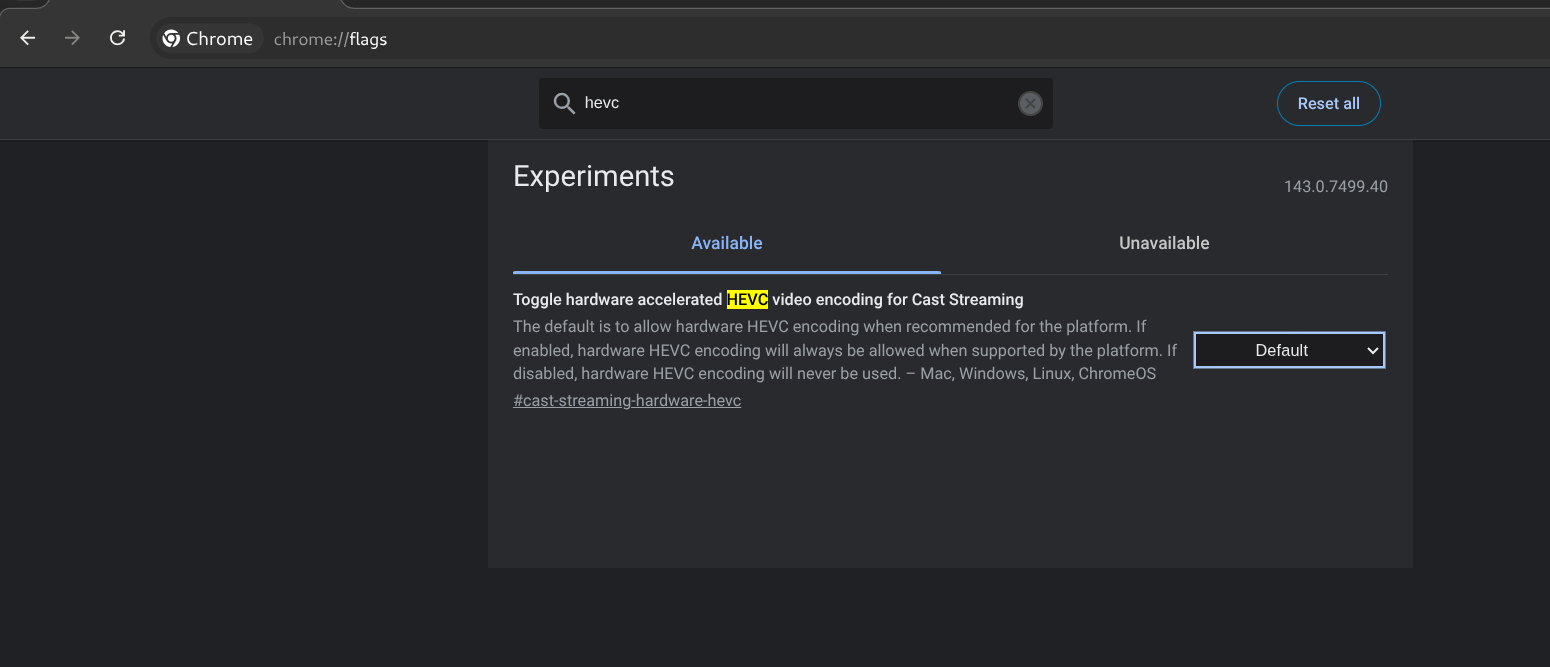
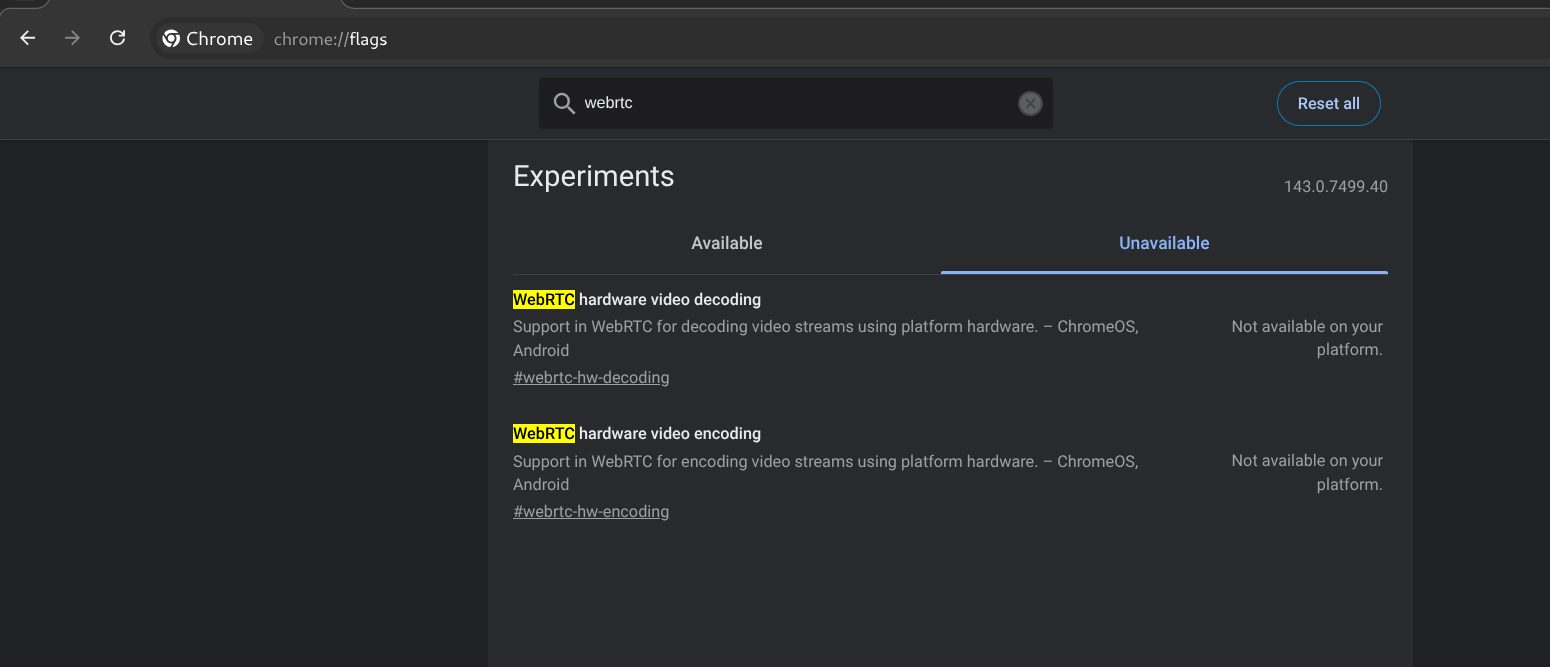
And based on our research, Chromium 114 does not include any experimental flags related to enabling HEVC (H.265) decoding in WebRTC. Also, Chromium v127+ only supports H.265 encoding, not decoding. The WebRTC HEVC flags are available only on ChromeOS and Android, here is screenshot of it.
To quickly verify which browsers support H.265 WebRTC, you can test here: https://vdo.ninja/h265
This page will clearly show that support currently exists only on Android and Apple devices. Also, please read the Important Compatibility Notice at the bottom of that page. On Android, it works without any flags because H.265 support is native after Chrome v136+, but still only for Android and ChromeOS.
Additional info we found about this WebRTC h265 streaming is that
HEVC/H.265 is patent-encumbered and was never made a mandatory WebRTC codec.
In practice:
Encoding (sending) support is very limited or behind flags.
Most browsers do not decode it at all.
Many WebRTC servers and clients don’t include H.265 payloaders.
For Example from Wowza Streaming Engine documentation:
Even though Wowza can ingest H.265, to serve via WebRTC you must transcode to H.264, meaning: You will need to go from H.265 to H.264 if you want WebRTC to work.
here is discussion How to stream a H.265 IP Camera stream to WebRTC in H.265 format? - Wowza Community
So currently H.265 in WebRTC is a special-case feature, not a widely supported standard.
And if you really needed to do this here is some Possible Workarounds
Transcode H.265 > H.264 or VP8/VP9 on the server.
This is the most compatible solution for all browsers.
Paid media servers
Some platforms like Ant Media Server and Nimble Streamer support H.265 → H.264 transcoding, but only work for Apple and Android users and are not free.
go2rtc (opensource)
A community tool by AlexxIT that can ingest H.265 (RTSP, etc.) and serve via WebRTC. It supports Safari by formatting packets as Apple expects and can optionally transcode. Because it is free and widely used in IP camera projects, it is a good option.
check out this issue: Support H265 for WebRTC in Safari with go2rtc · Issue #5 · AlexxIT/Blog · GitHub
It does not explicitly mentioned about Android and ChromeOS support yet as its 3 years old issue but its may support now if this helps.