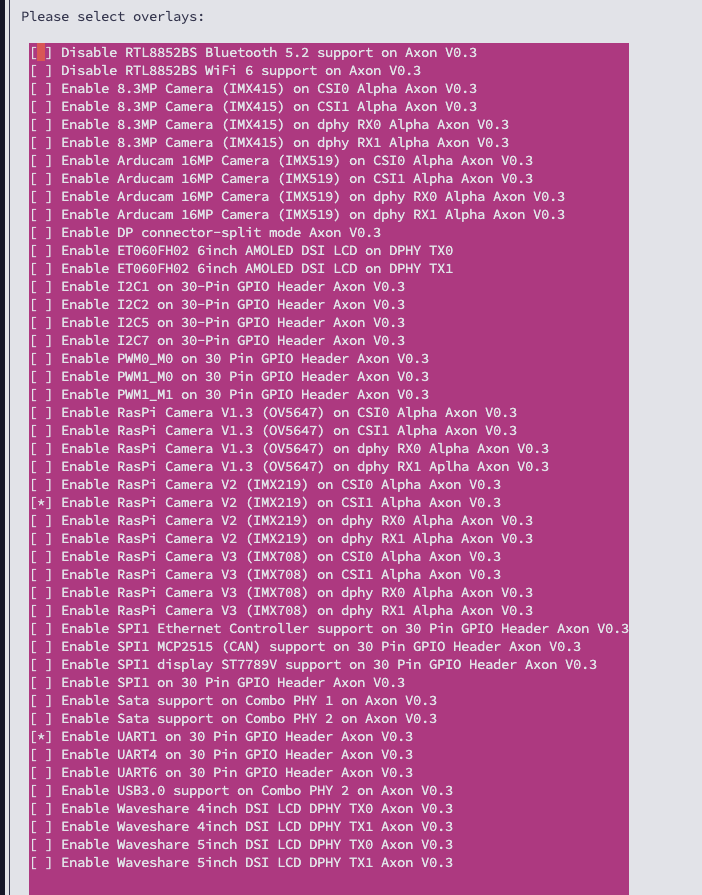
Could you confirm below mentioned things !?
Which overlay you have enabled !?
Give the output of cat /boot/extlinux/extlinux.conf
Give the output of ls -l /dev/video*
Give the output of sudo systemctl status rkaiq_3A.service
Again take the setup picture that includes only ( Camera + PCB + Connector of Axon )
Give the output of cat /etc/os-release
I am using CSI1 overlay
vicharak@vicharak:~$ cat /boot/extlinux/extlinux.conf
## /boot/extlinux/extlinux.conf
##
## IMPORTANT WARNING
##
## The configuration of this file is generated automatically.
## Do not edit this file manually, use: u-boot-update

default l0
menu title U-Boot menu
prompt 0
timeout 10


label l0
        menu label Vicharak Linux Kernel 6.1.75-axon
        linux /Image-6.1.75-axon
        initrd /initrd.img-6.1.75-axon
        fdt /rk3588-axon-linux-6.1.75-axon.dtb
        fdtoverlays  /overlays-6.1.75-axon/rk3588-axon_v0.3-camera-imx219-csi1-alpha.dtbo /overlays-6.1.75-axon/rk3588-axon_v0.3-uart1.dtbo
        append  audit=0 earlycon=uart8250,mmio32,0xfeb50000 console=ttyFIQ0 irqchip.gicv3_pseudo_nmi=0 loglevel=4 earlyprintk plymouth.ignore-serial-consoles quiet root=PARTUUID=ab71d60a-147a-42cf-9c32-34cf8342e536 rootwait rw splash coherent_pool=1m systemd.gpt_auto=0 cgroup_enable=memory swapaccount=1
vicharak@vicharak:~$ ls -l /dev/video*
crw-rw----+ 1 root video 81,  0 Jun  5 21:06 /dev/video0
crw-rw----+ 1 root video 81,  1 Jun  5 21:06 /dev/video1
crw-rw----+ 1 root video 81, 10 Jun  5 21:06 /dev/video10
crw-rw----+ 1 root video 81, 11 Jun  5 21:06 /dev/video11
crw-rw----+ 1 root video 81, 12 Jun  5 21:06 /dev/video12
crw-rw----+ 1 root video 81, 13 Jun  5 21:06 /dev/video13
crw-rw----+ 1 root video 81, 14 Jun  5 21:06 /dev/video14
crw-rw----+ 1 root video 81, 15 Jun  5 21:06 /dev/video15
crw-rw----+ 1 root video 81, 16 Jun  5 21:06 /dev/video16
crw-rw----+ 1 root video 81, 17 Jun  5 21:06 /dev/video17
crw-rw----+ 1 root video 81, 18 Jun  5 21:06 /dev/video18
crw-rw----+ 1 root video 81, 19 Jun  5 21:06 /dev/video19
crw-rw----+ 1 root video 81,  2 Jun  5 21:06 /dev/video2
crw-rw----+ 1 root video 81,  3 Jun  5 21:06 /dev/video3
crw-rw----+ 1 root video 81,  4 Jun  5 21:06 /dev/video4
crw-rw----+ 1 root video 81,  5 Jun  5 21:06 /dev/video5
crw-rw----+ 1 root video 81,  6 Jun  5 21:06 /dev/video6
crw-rw----+ 1 root video 81,  7 Jun  5 21:06 /dev/video7
crw-rw----+ 1 root video 81,  8 Jun  5 21:06 /dev/video8
crw-rw----+ 1 root video 81,  9 Jun  5 21:06 /dev/video9
lrwxrwxrwx  1 root root       7 Jun  5 21:06 /dev/video-camera0 -> video11
-rw-rw-rw-  1 root video      4 Jun  5 21:06 /dev/video-dec0
-rw-rw-rw-  1 root video      4 Jun  5 21:06 /dev/video-enc0
vicharak@vicharak:~$ sudo systemctl status rkaiq_3A.service
○ rkaiq_3A.service - Enable Rockchip camera engine rkaiq
     Loaded: loaded (/usr/lib/systemd/system/rkaiq_3A.service; enabled; preset: enabled)
     Active: inactive (dead) since Fri 2026-06-05 21:06:30 IST; 1 month 16 days ago
   Duration: 12ms
   Main PID: 794 (code=exited, status=0/SUCCESS)
        CPU: 30ms

Jun 05 21:06:30 vicharak rkaiq_3A[798]: ERR: Bad media topology for: /dev/media14
Jun 05 21:06:30 vicharak rkaiq_3A[798]: ERR: Bad media topology for: /dev/media15
Jun 05 21:06:30 vicharak rkaiq_3A[798]: XCORE:E:access /etc/iqfiles//FakeCamera0.json && /etc/iqfiles//FakeCamera0.bin failed!
Jun 05 21:06:30 vicharak rkaiq_3A[798]: XCORE:E:_rkAiqManager init error!
Jun 05 21:06:30 vicharak rkaiq_3A[798]: CAMHW:E:can't find sensor
Jun 05 21:06:30 vicharak rkaiq_3A[798]: XCORE:E:camhw deinit error -7
Jun 05 21:06:30 vicharak rkaiq_3A[798]: IPCSERVER:K:cid[-1] Deinit success
Jun 05 21:06:30 vicharak rkaiq_3A[798]: MessageParser process loop exit!
Jun 05 21:06:30 vicharak rkaiq_3A[798]: XCORE:K:cid[-1] rk_aiq_uapi_sysctl_deinit_locked success.
Jun 05 21:06:30 vicharak S40rkaiq_3A[834]: rkaiq_3A_server: no process found
vicharak@vicharak:~$ /etc/os-release
-bash: /etc/os-release: Permission denied
vicharak@vicharak:~$ sudo /etc/os-release
sudo: /etc/os-release: command not found
vicharak@vicharak:~$ cat /etc/os-release
PRETTY_NAME="Ubuntu 24.04.4 LTS"
NAME="Ubuntu"
VERSION_ID="24.04"
VERSION="24.04.4 LTS (Noble Numbat)"
VERSION_CODENAME=noble
ID=ubuntu
ID_LIKE=debian
HOME_URL="https://www.ubuntu.com/"
SUPPORT_URL="https://help.ubuntu.com/"
BUG_REPORT_URL="https://bugs.launchpad.net/ubuntu/"
PRIVACY_POLICY_URL="https://www.ubuntu.com/legal/terms-and-policies/privacy-policy"
UBUNTU_CODENAME=noble
LOGO=ubuntu-logo
vicharak@vicharak:~$
vk092
July 22, 2026, 12:49pm
4
@padaliyajay20 In your image, the camera is connected to CSI0 port, but you have enabled the CSI1 port overlay.
Try enabling the CSI0 port overlay, and let us know if it worked.
At the first i tried with CSI0 but it was not working so today i tested with CSI1. problem is not wrong overlay. as you can see in my first image, i was using CSI0
Make sure, rkaiq_3A service should be on and active.
sudo systemctl enable rkaiq_3A.service
sudo systemctl restart rkaiq_3A.service
Yes i did. so python now showing different errors.
vicharak@vicharak:~/camera$ python run.py
Using mplane plugin for capture
libv4l2: error turning on stream: Operation not permitted
[ WARN:0@0.431] global ./modules/videoio/src/cap_gstreamer.cpp (2401) handleMessage OpenCV | GStreamer warning: Embedded video playback halted; module v4l2src0 reported: Failed to allocate required memory.
libv4l2: warning v4l2 mmap buffers still mapped on close()
[ WARN:0@0.435] global ./modules/videoio/src/cap_gstreamer.cpp (1356) open OpenCV | GStreamer warning: unable to start pipeline
[ WARN:0@0.435] global ./modules/videoio/src/cap_gstreamer.cpp (862) isPipelinePlaying OpenCV | GStreamer warning: GStreamer: pipeline have not been created
[ WARN:0@0.436] global ./modules/videoio/src/cap_v4l.cpp (902) open VIDEOIO(V4L2:/dev/video11): can't open camera by index
False
Traceback (most recent call last):
  File "/home/vicharak/camera/run.py", line 11, in <module>
    cv2.imshow('frame', frame)
cv2.error: OpenCV(4.6.0) ./modules/highgui/src/window.cpp:967: error: (-215:Assertion failed) size.width>0 && size.height>0 in function 'imshow'
I also getting issue when i connect camera to CSI1, my keyboard stopped working and if i removed camera from CSI1 then keyboard start working
and camera is being too hot with CSI0 port. so right now i am using DPHY RX0
Can you send me link of camera module which is most compatible with axon?
any updates? I really need camera working, if you have any other camera suggestion, please send me link.
Raspberry Pi OV5647 5MP will be recommended.
Pratik
July 25, 2026, 5:42am
12
thank you for the confirmation. i will buy it
1 Like