Hi Vicharak team,
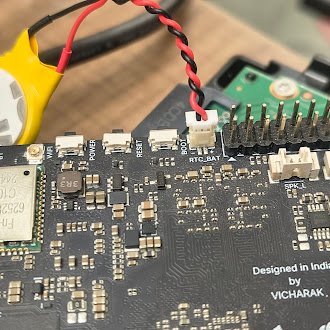
I am using a **Vicharak Axon board ** and I added the RTC battery as mentioned in the Axon RTC documentation.
I used a THIS RTC BATTERY. After connecting it, I set the system time and synced it to RTC using:
sudo hwclock --systohc
sudo hwclock --show
The RTC time shows correctly before reboot/power-off. But after rebooting / removing power and booting again after some time, I am not getting the saved RTC time back properly. I have also configured this to update rtc clock periodically. :
sudo hwclock --systohc
sudo hwclock -r
apt install cron
crontab -e
*/5 * * * * hwclock --systohc
Can you please help confirm whether this is a battery issue, RTC configuration issue, or if I am missing any step?
Logs/commands output:
root@kapidhwaj:/home/admin# dmesg | grep -i rtc
[   17.861608] rtc-hym8563 0-0051: rtc information is valid
[   17.868504] rtc-hym8563 0-0051: registered as rtc0
[   17.869502] rtc-hym8563 0-0051: setting system clock to 2000-01-01T00:00:17 UTC (946684817)
[   18.980668] rockchip-vop2 fdd90000.vop: [drm:vop2_crtc_atomic_disable] Crtc atomic disable vp0
[   19.030557] rockchip-vop2 fdd90000.vop: [drm:vop2_crtc_atomic_disable] *ERROR* unexpected power on pd6
[   19.030571] rockchip-vop2 fdd90000.vop: [drm:vop2_crtc_atomic_disable] *ERROR* unexpected power on pd5
[   19.188747] rockchip-vop2 fdd90000.vop: [drm:vop2_crtc_atomic_disable] wait for vp0 dsp_hold timeout
[   19.197711] rockchip-vop2 fdd90000.vop: [drm:vop2_crtc_atomic_enable] Update mode to 1368x768p60, type: 11(if:HDMI0, flag:0x0) for vp0 dclk: 85500000
[   19.198268] rockchip-vop2 fdd90000.vop: [drm:vop2_crtc_atomic_enable] dclk_out0 div: 0 dclk_core0 div: 2
[   19.198645] rockchip-vop2 fdd90000.vop: [drm:vop2_crtc_atomic_enable] set dclk_vop0 to 85500000, get 85500000
[   26.996363] rockchip-vop2 fdd90000.vop: [drm:vop2_crtc_atomic_disable] Crtc atomic disable vp0
[   27.016388] rockchip-vop2 fdd90000.vop: [drm:vop2_crtc_atomic_disable] *ERROR* unexpected power on pd6
[   27.016409] rockchip-vop2 fdd90000.vop: [drm:vop2_crtc_atomic_disable] *ERROR* unexpected power on pd5
[   27.100666] rockchip-vop2 fdd90000.vop: [drm:vop2_crtc_atomic_enable] Update mode to 1368x768p60, type: 11(if:HDMI0, flag:0x0) for vp0 dclk: 85500000
[   27.101104] rockchip-vop2 fdd90000.vop: [drm:vop2_crtc_atomic_enable] dclk_out0 div: 0 dclk_core0 div: 2
[   27.101126] rockchip-vop2 fdd90000.vop: [drm:vop2_crtc_atomic_enable] set dclk_vop0 to 85500000, get 85500000
root@kapidhwaj:/home/admin# dmesg | grep -i 8563
[   17.861608] rtc-hym8563 0-0051: rtc information is valid
[   17.868504] rtc-hym8563 0-0051: registered as rtc0
[   17.869502] rtc-hym8563 0-0051: setting system clock to 2000-01-01T00:00:17 UTC (946684817)
[   18.078563] mpp_rkvdec2 fdc38100.rkvdec-core: [139, 180224]
root@kapidhwaj:/home/admin# sudo hwclock --show
2026-03-13 23:21:53.831018+05:30
root@kapidhwaj:/home/admin# timedatectl
               Local time: Wed 2026-06-03 15:25:43 IST
           Universal time: Wed 2026-06-03 09:55:43 UTC
                 RTC time: Fri 2026-03-13 17:51:59
                Time zone: Asia/Kolkata (IST, +0530)
System clock synchronized: no
              NTP service: n/a
          RTC in local TZ: no
root@kapidhwaj:/home/admin#
Setup Images :

Thanks.