Hello, let’s arrange meeting tomorrow morning, to understand issue properly?
could you please share your Email ID or teams ID
tejas.dabhankar@vicharak.in
@firmware02 We have updated the latest project on the server with the required fixes. First, check the existing bitstreams on the device using:
sudo bitman -l
Then remove all previous bitstreams using:
sudo bitman -r
After that, rerun the peripheral sync command:
sudo periplex-sync uart.json
Once completed, you should be ready to go.
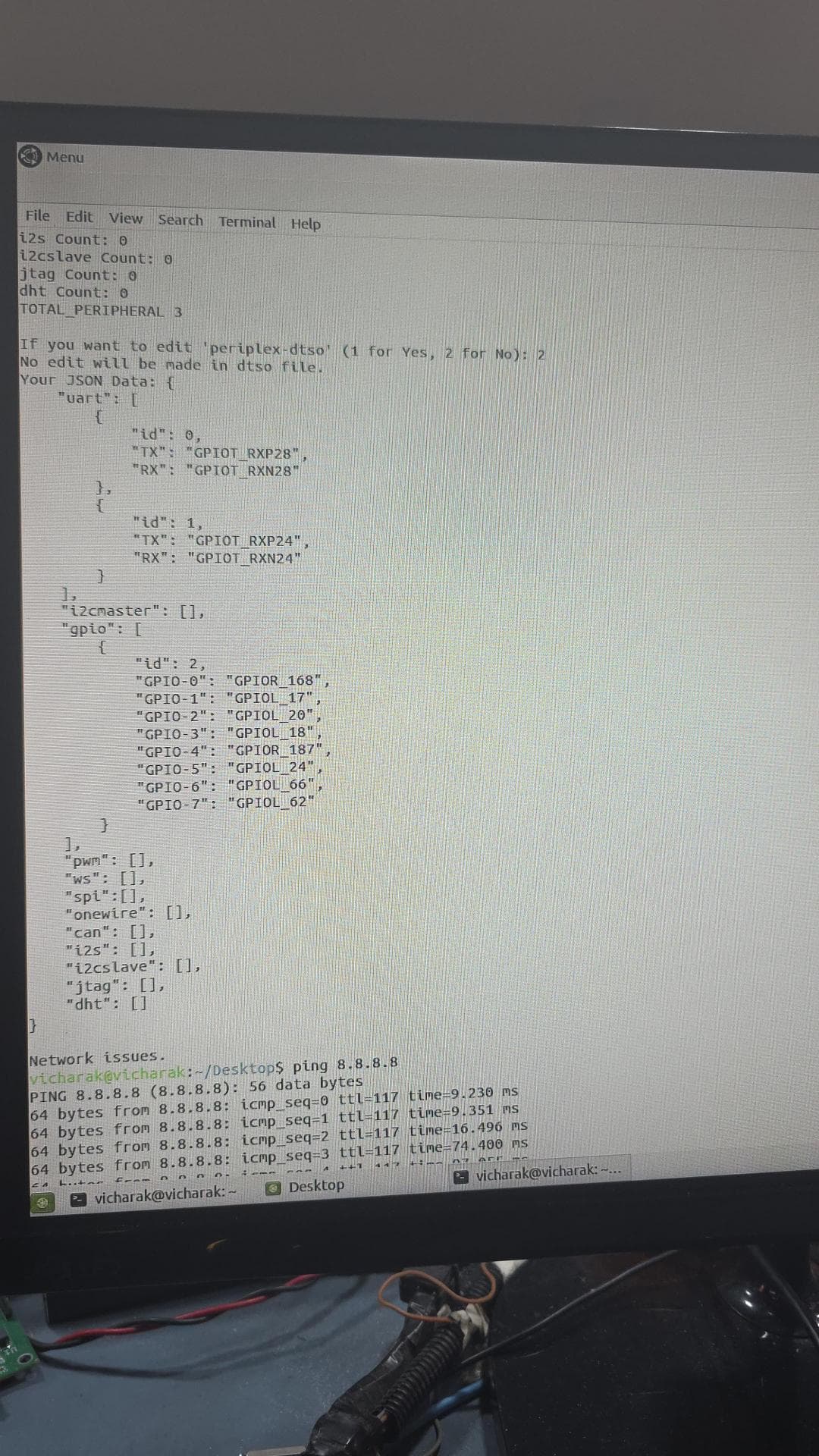
The issue is on our server side and will be resolved shortly.
okay plz let me know
The issue has been resolved, you can try it now.
vicharak@vicharak:~/Desktop$ cat gpio.json
{
“uart”: [
{
“id”: 0,
“TX”: “GPIOT_RXP28”,
“RX”: “GPIOT_RXN28”
},
{
“id”: 1,
“TX”: “GPIOT_RXP24”,
“RX”: “GPIOT_RXN24”
}
],
“i2cmaster”: ,
“gpio”: [
{
“id”: 2,
“GPIO-0”: “GPIOR_168”,
“GPIO-1”: “GPIOL_17”,
“GPIO-2”: “GPIOL_20”,
“GPIO-3”: “GPIOL_18”,
“GPIO-4”: “GPIOR_187”,
“GPIO-5”: “GPIOL_24”,
“GPIO-6”: “GPIOL_66”,
“GPIO-7”: “GPIOL_62”
}
],
“pwm”: ,
“ws”: ,
“spi”:,
“onewire”: ,
“can”: ,
“i2s”: ,
“i2cslave”: ,
“jtag”: ,
“dht”:
}
vicharak@vicharak:~/Desktop$
This is my JSON file. PERI0 is not working, but PERI1 is working properly.
I checked the server database and found that the request is arriving with the following data. The UART mapping appears to be reversed compared to your configuration.
{
    "uart": [
        {
            "id": 0,
            "TX": "GPIOT_RXP24",
            "RX": "GPIOT_RXN24"
        },
        {
            "id": 1,
            "TX": "GPIOT_RXP28",
            "RX": "GPIOT_RXN28"
        }
    ],
    "i2cmaster": [],
    "gpio": [
        {
            "id": 2,
            "GPIO-0": "GPIOR_168",
            "GPIO-1": "GPIOL_17",
            "GPIO-2": "GPIOL_20",
            "GPIO-3": "GPIOL_18",
            "GPIO-4": "GPIOR_187",
            "GPIO-5": "GPIOL_24",
            "GPIO-6": "GPIOL_66",
            "GPIO-7": "GPIOL_62"
        }
    ],
    "pwm": [],
    "ws": [],
    "spi": [],
    "onewire": [],
    "can": [],
    "i2s": [],
    "i2cslave": [],
    "jtag": [],
    "dht": []
}
This configuration is working as follows:
- ttyPERI0 (id = 0) is mapped to:
- TX → GPIOT_RXP24
- RX → GPIOT_RXN24
- ttyPERI1 (id = 1) is mapped to:
- TX → GPIOT_RXP28
- RX → GPIOT_RXN28
Please verify that each ttyPERI device is correctly associated with its respective id and the corresponding TX/RX GPIO pins.
If you want to use your configuration, please run the periplex-sync command with the following JSON:
{
    "uart": [
        {
            "id": 0,
            "TX": "GPIOT_RXP28",
            "RX": "GPIOT_RXN28"
        },
        {
            "id": 1,
            "TX": "GPIOT_RXP24",
            "RX": "GPIOT_RXN24"
        }
    ],
    "i2cmaster": [],
    "gpio": [
        {
            "id": 2,
            "GPIO-0": "GPIOR_168",
            "GPIO-1": "GPIOL_17",
            "GPIO-2": "GPIOL_20",
            "GPIO-3": "GPIOL_18",
            "GPIO-4": "GPIOR_187",
            "GPIO-5": "GPIOL_24",
            "GPIO-6": "GPIOL_66",
            "GPIO-7": "GPIOL_62"
        }
    ],
    "pwm": [],
    "ws": [],
    "spi": [],
    "onewire": [],
    "can": [],
    "i2s": [],
    "i2cslave": [],
    "jtag": [],
    "dht": []
}
If the same issue still occurs, please share a screenshot of the periplex-sync command execution.
I am using
ttyPERI0 (id = 0) for
- TX → GPIOT_RXP28
- RX → GPIOT_RXN28
&
ttyPERI1 (id = 1) for
- TX → GPIOT_RXP24
- RX → GPIOT_RXN24
send me a screenshot of your periplex-sync command with this json configuration
{
    "uart": [
        {
            "id": 0,
            "TX": "GPIOT_RXP28",
            "RX": "GPIOT_RXN28"
        },
        {
            "id": 1,
            "TX": "GPIOT_RXP24",
            "RX": "GPIOT_RXN24"
        }
    ],
    "i2cmaster": [],
    "gpio": [
        {
            "id": 2,
            "GPIO-0": "GPIOR_168",
            "GPIO-1": "GPIOL_17",
            "GPIO-2": "GPIOL_20",
            "GPIO-3": "GPIOL_18",
            "GPIO-4": "GPIOR_187",
            "GPIO-5": "GPIOL_24",
            "GPIO-6": "GPIOL_66",
            "GPIO-7": "GPIOL_62"
        }
    ],
    "pwm": [],
    "ws": [],
    "spi": [],
    "onewire": [],
    "can": [],
    "i2s": [],
    "i2cslave": [],
    "jtag": [],
    "dht": []
}
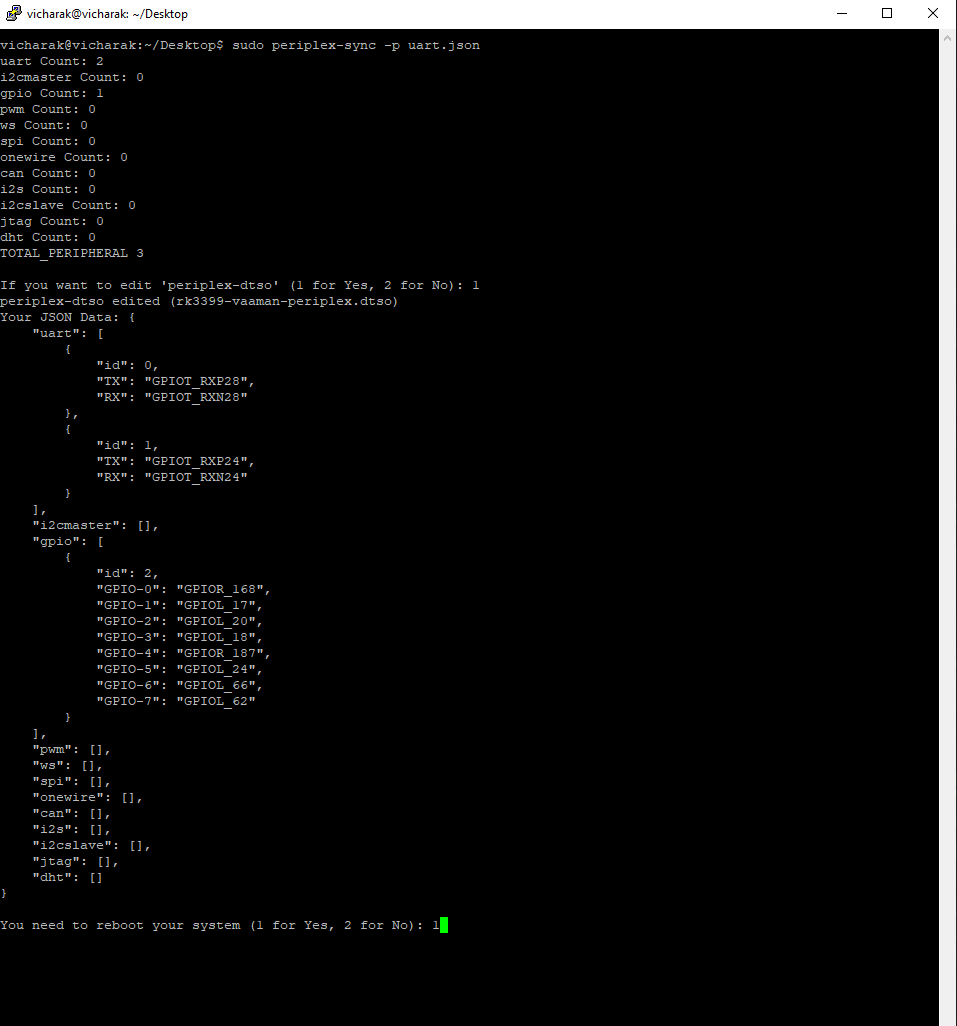
Still same problem PERI0 is not working, but PERI1 is working properly.
okay , now we need to remove the locally store bitstream first , so give me output of this command :
cat /opt/periplex/content.txt
and also provide the output of this command :
sudo bitman -l
and also provide the output of this command :
cat /opt/periplex/dts/rk3399-vaaman-periplex.dtso
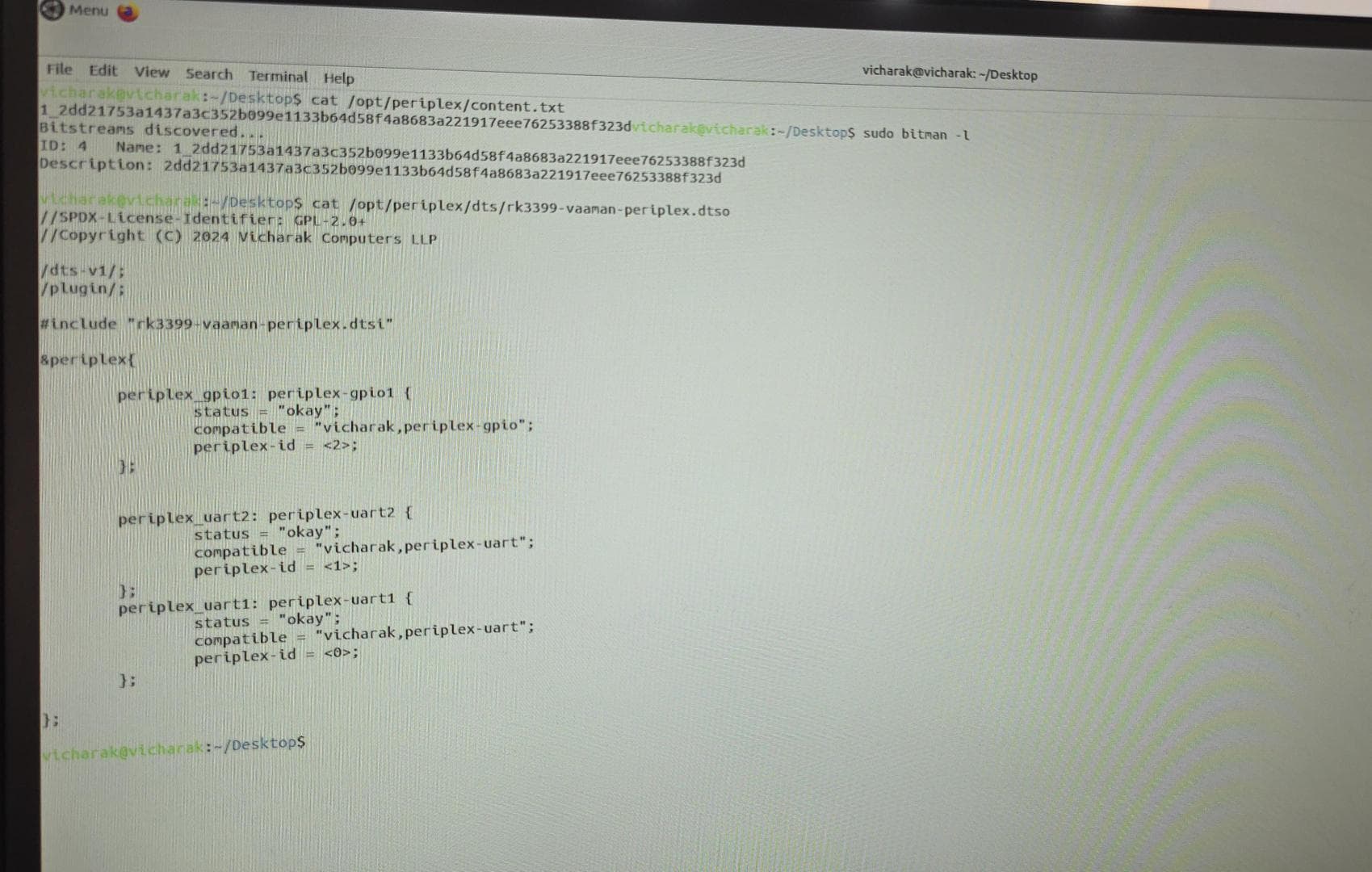
run this command
sudo bitman -r 4
and again run periplex-sync for this json
{
    "uart": [
        {
            "id": 0,
            "TX": "GPIOT_RXP28",
            "RX": "GPIOT_RXN28"
        },
        {
            "id": 1,
            "TX": "GPIOT_RXP24",
            "RX": "GPIOT_RXN24"
        }
    ],
    "i2cmaster": [],
    "gpio": [
        {
            "id": 2,
            "GPIO-0": "GPIOR_168",
            "GPIO-1": "GPIOL_17",
            "GPIO-2": "GPIOL_20",
            "GPIO-3": "GPIOL_18",
            "GPIO-4": "GPIOR_187",
            "GPIO-5": "GPIOL_24",
            "GPIO-6": "GPIOL_66",
            "GPIO-7": "GPIOL_62"
        }
    ],
    "pwm": [],
    "ws": [],
    "spi": [],
    "onewire": [],
    "can": [],
    "i2s": [],
    "i2cslave": [],
    "jtag": [],
    "dht": []
}
Send me a screenshot of the periplex-sync command output and try running it again. If it still doesn’t work, I’ll recreate the same scenario on my end.
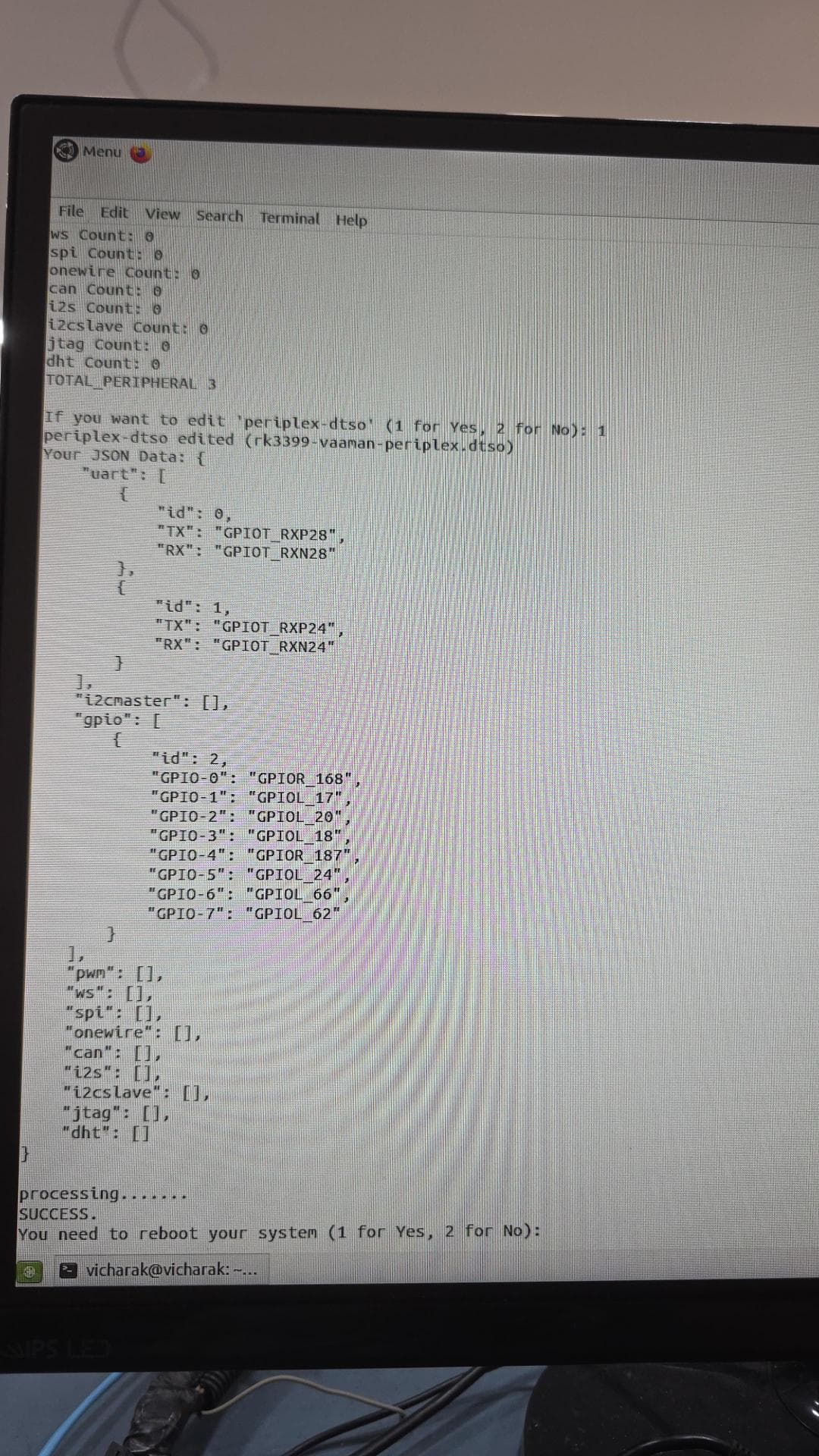
reboot the board ,try it again and let me know whether it’s working or not
still not working is any board problem