Need Overlays for IMX 219 camera,
Currently I have Radxa IMX 219 camera but cant find any overlays for axon lite
Okay, will update you tomorrow.
Using sudo apt update and sudo apt upgrade.
You will be given overlay for that.
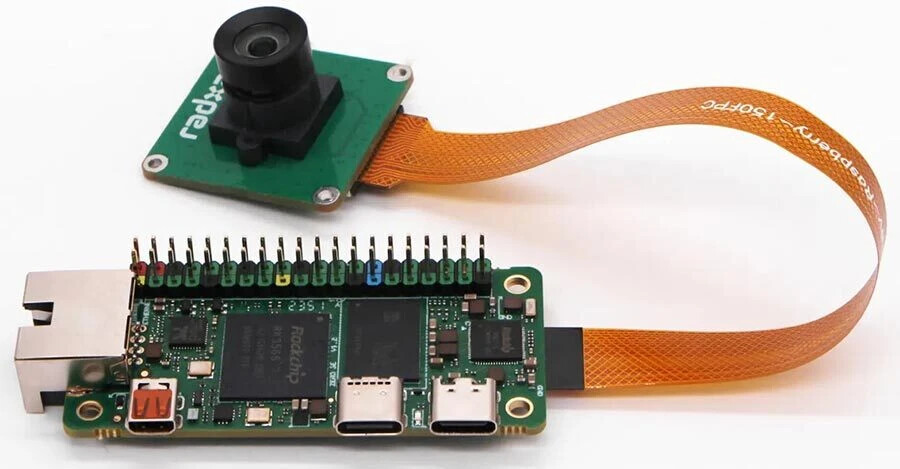
Which connector and how many lanes camera are you using?
Kernel-with-overlays
Download the deb package, install using
sudo apt install ./linux-image-6.1.75-axon-lite_20260916-axon-lite_arm64.deb
Enable overlay through vicharak-config and then tell me
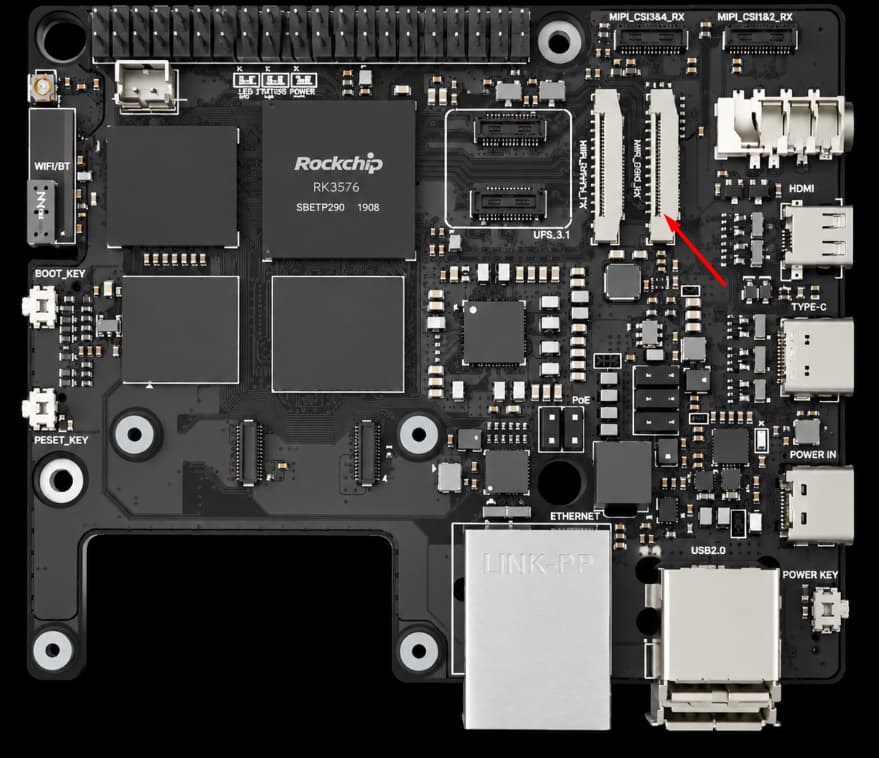
I plugged the camera in this port , and enalbed overlay for CIS 1
Logs :
vicharak@axon-lite:~$ dmesg | grep -i imx
[ 10.177591] imx219 2-0010: driver version: 00.01.01
[ 10.177793] imx219 2-0010: Reading register 100 from 10 failed
[ 10.177943] imx219 2-0010: Reading register 100 from 10 failed
[ 10.184365] imx219 2-0010: Error -5 setting default controls
[ 10.184383] imx219: probe of 2-0010 failed with error -5
Wait, I am dropping an image with a single overlay for the DCPHY RX0 port which you have connected on, the current one won’t work on this interface.
Cant find the overlay , Also the attached file is of same version as previous

I checked seems not working , am I missing something , I have connected camera on both MIPI_DHPY0 & MIPI_CSI0
Logs
vicharak@axon-lite:~$ dmesg | grep -i imx219
[   10.162589] imx219 3-0010: driver version: 00.01.01
[   10.186754] imx219 3-0010: Model ID 0x0219, Lot ID 0x4b2582, Chip ID 0x063f
[   10.186776] ==> imx219 ken: 1145 imx219_probe
[   10.256438] imx219 3-0010: Consider updating driver imx219 to match on endpoints
[   10.256480] rockchip-csi2-dphy csi2-dcphy0: dphy0 matches m02_f_imx219 3-0010:bus type 5
vicharak@axon-lite:~$ sudo cam -l
[0:11:00.426881223] [8631]  INFO Camera camera_manager.cpp:327 libcamera v0.4.0
Available cameras:
vicharak@axon-lite:~$
We can deduce from the logs , that the camera has been probed.
Do the following:
ls -l /dev/video*
Once you find your video device
Use qv4l2 GUI to grab an output from it, tell me how it turns out.
its working , also can you update the remote overlays too
1 Like
Seems ffplay & gstream not working ,
Also
vicharak@axon-lite:~$ gst-inspect-1.0 mpph264enc
No such element or plugin 'mpph264enc'
error logs
vicharak@axon-lite:~$ ffplay -f v4l2 -pixel_format nv12 -video_size 1920x1080 /dev/video11
ffplay version 7.1.5-0+deb13u1 Copyright (c) 2003-2026 the FFmpeg developers
  built with gcc 14 (Debian 14.2.0-19)
  configuration: --prefix=/usr --extra-version=0+deb13u1 --toolchain=hardened --libdir=/usr/lib/aarch64-linux-gnu --incdir=/usr/include/aarch64-linux-gnu --arch=arm64 --enable-gpl --disable-stripping --disable-libmfx --disable-omx --enable-gnutls --enable-libaom --enable-libass --enable-libbs2b --enable-libcdio --enable-libcodec2 --enable-libdav1d --enable-libflite --enable-libfontconfig --enable-libfreetype --enable-libfribidi --enable-libglslang --enable-libgme --enable-libgsm --enable-libharfbuzz --enable-libmp3lame --enable-libmysofa --enable-libopenjpeg --enable-libopenmpt --enable-libopus --enable-librubberband --enable-libshine --enable-libsnappy --enable-libsoxr --enable-libspeex --enable-libtheora --enable-libtwolame --enable-libvidstab --enable-libvorbis --enable-libvpx --enable-libwebp --enable-libx265 --enable-libxml2 --enable-libxvid --enable-libzimg --enable-openal --enable-opencl --enable-opengl --disable-sndio --disable-libvpl --enable-libdc1394 --enable-libdrm --enable-libiec61883 --enable-chromaprint --enable-frei0r --enable-ladspa --enable-libbluray --enable-libcaca --enable-libdvdnav --enable-libdvdread --enable-libjack --enable-libpulse --enable-librabbitmq --enable-librist --enable-libsrt --enable-libssh --enable-libsvtav1 --enable-libx264 --enable-libzmq --enable-libzvbi --enable-lv2 --enable-sdl2 --enable-libplacebo --enable-librav1e --enable-pocketsphinx --enable-librsvg --enable-libjxl --enable-shared
  libavutil      59. 39.100 / 59. 39.100
  libavcodec     61. 19.101 / 61. 19.101
  libavformat    61.  7.103 / 61.  7.103
  libavdevice    61.  3.100 / 61.  3.100
  libavfilter    10.  5.100 / 10.  5.100
  libswscale      8.  3.100 /  8.  3.100
  libswresample   5.  3.100 /  5.  3.100
  libpostproc    58.  3.100 / 58.  3.100
[video4linux2,v4l2 @ 0x7f60000c20] ioctl(VIDIOC_G_INPUT): Inappropriate ioctl for device
/dev/video11: Inappropriate ioctl for device

vicharak@axon-lite:~$
Will look into it
You’ll have an update soon
Hey , any update ? also while I was checking with GUI tool the image from IMX 219 is too dark , I have checked the camera with other SBC (Radxa Zero 3w) the camera is Fine and working, is this due to any setting in GUI tool qv4l2 ?
What you are seeing is raw camera output.
You’ll have ffplay and gstreamer support for the board soon.
Then the processing will look much more mature.
The dark image is a result of missing ISP configuration.
Keep in mind these packages will not be part of the main image itself, for the sake of low resource consumption.
Currently the overlay is fixed for a particular port can you make it generic or available for other ports too